Parsing CSV with Apex
If you’re working with user inputs or external integrations in Salesforce, chances are you’ve needed to parse a comma-separated string (CSV) into a usable collection at some point. I recently did this while working on an admin utility flow for updating territory ownership in LeanData without going into the LeanData UI: the user can enter a comma separated list of usernames or territories and the system fuzzy searches each value in the territory routing configuration objects.
The simplest way to do this is with an invocable Apex class. You pass the CSV string into the class from a Flow, and it parses it and returns a collection of strings ready for use.
Here’s a sample Apex class that does exactly that:
public class CSVParser {

    public class InputWrapper {
        @InvocableVariable(required=true)
        public String csvString;
    }

    public class OutputWrapper {
        @InvocableVariable
        public List<String> values;
    }

    @InvocableMethod(label='Parse CSV' description='Converts a comma-separated string into a list of values')
    public static List<OutputWrapper> parseCSV(List<InputWrapper> inputs) {
        List<OutputWrapper> results = new List<OutputWrapper>();
        for (InputWrapper input : inputs) {
            OutputWrapper output = new OutputWrapper();
            output.values = new List<String>();

            if (String.isNotBlank(input.csvString)) {
                for (String s : input.csvString.split(',')) {
                    output.values.add(s.trim());
                }
            }
            results.add(output);
        }
        return results;
    }
}
This class allows you to pass a single string like “apple, banana, grape” into a Flow action and receive a collection [“apple”, “banana”, “grape”] in return. Clean, efficient, and highly reusable.
But what if you don’t have access to Apex or developer support? You can still parse CSVs using only Flow logic with just a little creativity.
Parsing CSV with flow elements
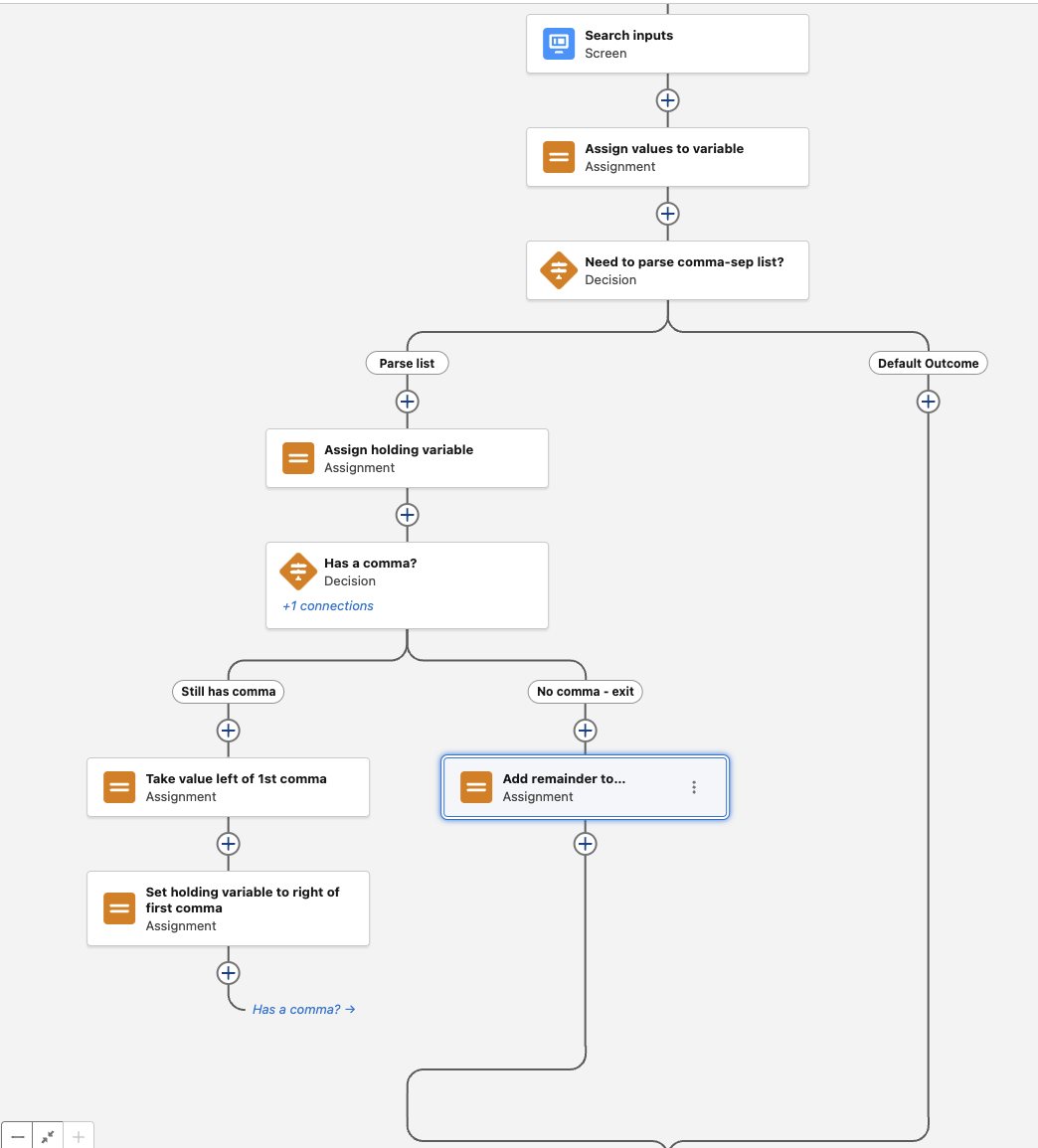
Start with a Screen element where the user inputs a comma-separated list, or maybe an integration writes a CSV datapoint into a field. Assign that value to a variable for processing. Then use a Decision element to check if the string contains any commas. If it doesn’t, you’re done because you can use the value directly and parsing is not needed. This handles for single-value strings. If it does have a comma though, route the flow into a loop that handles parsing.
Note that this isn’t a “real” loop because you can’t loop over a CSV string. That’s the whole point we’re trying to fix here is taking the CSV value and turning it into a collection so you can do things like loops with it. For this to work we’re just using Assignment elements and a connector back to the prior element to create a sort of de facto loop without using the Loop element.
Inside the special loop that’s not a loop, use a series of Assignment elements to:
- Store the unprocessed string in a new holding variable like
originalValue - Extract the first value (everything left of the first comma) using a formula like
LEFT({!originalValue}, FIND(",", {!originalValue}) - 1) - Add that value to a text collection you might call
parsedValues - Before you loop back, you need to trim out the value left of the first comma from
originalValueby assigning it the value of everything to the right of the first comma. Do this with a formula likeRIGHT({!originalValue}, LEN({!originalValue}) - FIND(",", {!originalValue})) - Now you can loop back to the earlier Decision element to go again
This process repeats until there are no commas left. At that point, the last value is added to the collection and the loop that’s not a loop exits.
This flow-based approach gives you a way to parse CSV strings without any Apex at all. It’s slower and more manual, but totally achievable with the out of the box flow tools features.
If you can use Apex, start with the invocable class—it’s far cleaner and will save you time. But even without code, you’re not blocked. With a little creativity, you can still parse a CSV right inside Flow.